WorkPause ON
Your schedule takes over.
Work apps follow your saved daily rules. Turning WorkPause on applies the current scheduled state, too.
Applies immediately. No Save needed.A little more life. A little less work.
Give your Android work profile a closing time. Set your hours, switch WorkPause on, and let your schedule draw the line.
1.0.3 Preview. Requires an existing Android work profile.
New: work-PIN reminders. Notification setup required.
Simple by design
WorkPause controls whether your schedule runs. It is not another switch for turning your work apps on and off manually.
Work apps follow your saved daily rules. Turning WorkPause on applies the current scheduled state, too.
Applies immediately. No Save needed.WorkPause stops making automatic changes. Work apps stay as they are, and your phone's normal controls and policies still apply.
Your saved schedule stays ready for later.A week that works for you
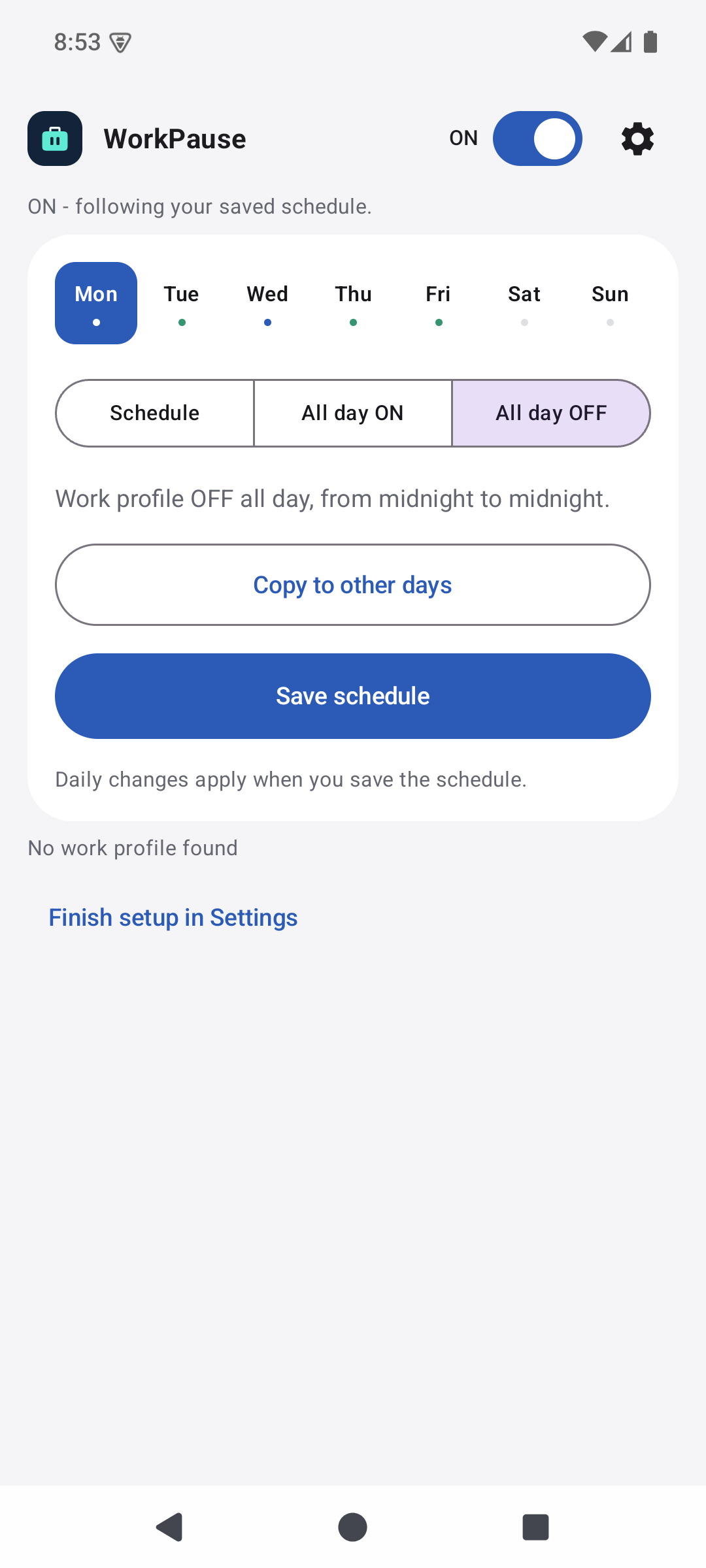
A regular Monday. A flexible Friday. A properly quiet Sunday. Give each weekday its own rule.
Work apps ON between your From and To times.
Keep your work profile on from midnight to midnight.
Keep your work profile paused for the entire day.
These are daily rules, followed while WorkPause is ON. Save schedule applies daily edits; the main switch never saves unfinished changes.
Copy one day's rule and remembered hours to the other days you choose.
From later than To? The schedule runs overnight. An All day OFF rule takes priority at the next midnight.
Scheduling uses Android alarms rather than a continuously running scheduler service. No app account needed.
A few minutes to set up
Install on the personal side of your phone. WorkPause uses your existing work profile; it does not create one or replace your employer's management.
Download the signed APK from GitHub Releases. Install with ADB or open the APK directly on your phone.
Get the latest releaseFor silent switching, grant one permission from an authorized computer using ADB. No root required.
Read the setup guideChoose each day's rule, tap Save schedule, and turn WorkPause ON. Allow exact alarms; unrestricted battery use is recommended.
Connect your phone and authorize USB debugging first.
adb shell pm grant io.github.marinfrankovic.workpause android.permission.MODIFY_QUIET_MODEInstalling without ADB is possible, but does not grant silent control. The optional accessibility fallback visibly operates Quick Settings, and confirmations may need your input. Android and employer restrictions always apply.
Open about what is tested
WorkPause 1.0.3 Preview passed 43 automated tests, build and lint checks, and release-signature checks. Its notification-to-PIN flow was tested with a disposable managed work profile on an Android 15 emulator, including cancellation, explicit retry, and reminder cleanup.
User-confirmed on Samsung Galaxy S24 Ultra with One UI 9: the owner personally tested WorkPause 1.0.2 and reports that it works as expected. Installation and setup readiness were also checked independently.
The owner also reports needing the work-profile PIN when the profile turns back on. This is expected: silent control does not unlock the profile or bypass credentials. The 1.0.3-preview update was installed and opened on that phone with permissions retained; its new Samsung notification and PIN flow still needs functional testing. These results are not a general compatibility certification. Other locked-device / credential scenarios and Intune / Knox compatibility remain unverified.
Read the full validation recordGood questions
No. It stops WorkPause's automatic changes and leaves the current work-profile state untouched. Your phone's normal controls remain available. Your daily rules are kept for later.
Yes. WorkPause schedules an existing Android work profile; it does not create one. Samsung Secure Folder is not a substitute for a managed work profile.
Yes. Download the APK on your phone and follow Android's installation prompts. Silent control still needs the separate one-time ADB grant from a computer. See the setup guide for the optional visible fallback and sideloading restrictions.
Unlock reminders are a separate setup step from silent control and exact alarms. In WorkPause Settings, allow Unlock reminders, then review the Work profile unlock reminders channel in Android settings. Scheduling is not disabled if you block notifications, but you will not receive the reminder.
On Android 11+, scheduled resumes do not request automatic PIN popups. A reminder offers an explicit action: tap it for Android's PIN screen or a work-app picker. Enable banners/pop-ups in the reminder channel if you want a heads-up alert; Android, Samsung settings, and Do Not Disturb control whether it appears. Otherwise look in the notification shade. Android 10 uses an older resume API and may show its own credential UI.
No. Silent control requests pause/resume without operating Quick Settings; it does not unlock the profile. When Android or employer policy requires the PIN, you must enter it before work apps become available. WorkPause never reads the PIN. Canceling returns to the picker, where Resume work profile is an explicit retry; if Android or policy blocks access, use your normal work-app icons. Other real-device locked-resume scenarios remain unverified.
Yes. WorkPause is an independently maintained Apache-2.0 fork of Work Profile Scheduler. The source, release APKs, license, and original attribution are available on GitHub.
A small tool for a clearer boundary.
Get WorkPause Android 10+ · Existing work profile required · 1.0.3 Preview